The Poor Man's Congestion Point: DCQCN with TC RED and a Linux Bridge
25 Mar 2026In the RDMA lab I built a two-node setup using dual-port ConnectX-4 cards with PF passthrough, connected point-to-point over fiber. That setup is great for simple RDMA performance testing but I wanted to go further and explore how congestion control works in RoCEv2 networks.
RoCEv2 uses DCQCN (Data Center Quantized Congestion Notification) to prevent congestion collapse. Three roles work together:
- Congestion Point (CP) - a network device where queues build up. When congestion is detected, it sets the CE (Congestion Experienced) bit on passing packets via ECN.
- Notification Point (NP) - the receiver NIC. It detects CE-marked packets and sends back a CNP (Congestion Notification Packet) to the sender.
- Reaction Point (RP) - the sender NIC. It receives the CNP and throttles its transmission rate.
This creates a closed feedback loop:
        marks CE                sends CNP
  CP ─────────────────► NP ─────────────────► RP
  (switch)       (receiver NIC)        (sender NIC)
  ▲                                           │
  │              congestion clears,           │
  └───────────── RP ramps back up ◄───────────┘
                                     throttles rate
The problem: on a point-to-point link with no switch in the middle there is no Congestion Point so DCQCN never activates.
The obvious solution is buying a switch but even a used Mellanox SN2010 costs more than the entire lab 😄 In this post I want to take a different approach and use the second port of each dual-port card to forward RDMA traffic through a host bridge with Linux Traffic Control, turning the host into a software congestion point.
The Idea
Each CX-4 card has two physical ports. The original lab uses port 0 of each card connected via fiber. Port 1 of each card is also connected by a second fiber cable. By assigning different ports to the VMs and the host we can send all traffic through the host’s bridge.
The key insight: pass port 0 of card A and port 1 of card B to the VMs, keep port 1 of card A and port 0 of card B on the host and bridge them. The existing cables connect port 0↔port 0 and port 1↔port 1 between the cards so VM traffic must cross the host bridge to reach the other VM.
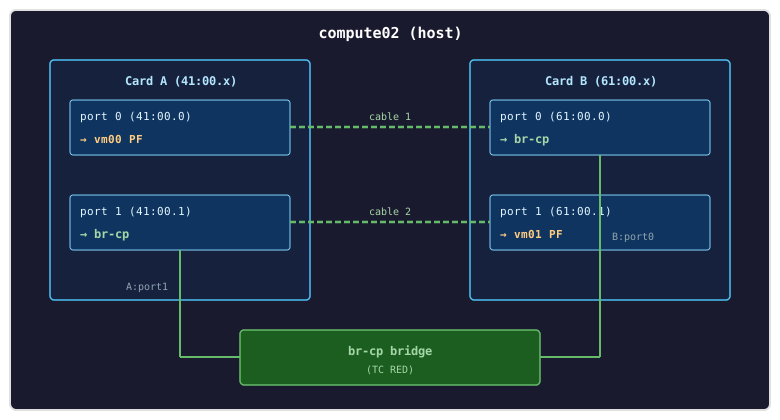
Traffic path: vm00 (A:port0) ➔ cable 1 ➔ B:port0 (host) ➔ bridge + TC RED ➔ A:port1 (host) ➔ cable 2 ➔ B:port1 (vm01)
Both VMs get full PF passthrough with complete RDMA capability - GID tables, hardware QPs, the full stack. The host bridge is purely L2, forwarding Ethernet frames (including RoCEv2 packets) between its two ports.
What Changes from the Lab Setup
| Component | Original | This experiment |
|---|---|---|
| NIC passthrough | Port 0 PF | Port 0 PF for vm00, Port 1 PF for vm01 |
| Host role | Out of data path | L2 bridge between port 1 (card A) and port 0 (card B) |
| Cables | Port 0 ↔ Port 0 (1 cable) | Port 0 ↔ Port 0 + Port 1 ↔ Port 1 (2 cables) |
Step 1: Rebind Ports
Shut down the VMs and reconfigure driver bindings. Card A port 0 stays on vfio-pci for vm00. Card B port 0 moves from vfio-pci to mlx5_core (host bridge). Card B port 1 moves from mlx5_core to vfio-pci (vm01). Card A port 1 stays on mlx5_core (host bridge):
virsh destroy vm00
virsh destroy vm01

# Card B port 0: vfio-pci → mlx5_core (host bridge)
echo 0000:61:00.0 > /sys/bus/pci/drivers/vfio-pci/unbind
echo mlx5_core > /sys/bus/pci/devices/0000:61:00.0/driver_override
echo 0000:61:00.0 > /sys/bus/pci/drivers/mlx5_core/bind

# Card B port 1: mlx5_core → vfio-pci (vm01)
echo 0000:61:00.1 > /sys/bus/pci/drivers/mlx5_core/unbind
echo vfio-pci > /sys/bus/pci/devices/0000:61:00.1/driver_override
echo 0000:61:00.1 > /sys/bus/pci/drivers/vfio-pci/bind

# Verify bindings
for d in 41:00.0 41:00.1 61:00.0 61:00.1; do
  drv=$(basename $(readlink /sys/bus/pci/devices/0000:$d/driver))
  echo "$d -> $drv"
done
# 41:00.0 -> vfio-pci
# 41:00.1 -> mlx5_core
# 61:00.0 -> mlx5_core
# 61:00.1 -> vfio-pci
Resulting driver bindings:
| PCI | Port | Driver | Role |
|---|---|---|---|
| 41:00.0 | A:port0 | vfio-pci | vm00 (unchanged) |
| 41:00.1 | A:port1 | mlx5_core | Host bridge |
| 61:00.0 | B:port0 | mlx5_core | Host bridge |
| 61:00.1 | B:port1 | vfio-pci | vm01 |
Step 2: Disable RoCE on Host Ports
This is the critical step that makes RDMA-through-a-bridge work. By default, the mlx5 driver’s RDMA engine intercepts incoming RoCEv2 packets (UDP port 4791) in hardware before they reach the kernel’s networking stack. The bridge never sees them - they’re consumed by the NIC’s RDMA hardware and silently dropped (no matching QPs on the host).
Disabling RoCE on the host-side ports makes the NIC treat RoCEv2 packets as ordinary UDP traffic, delivering them to the kernel networking stack where the bridge can forward them:
# Disable RoCE on both host ports
devlink dev param set pci/0000:41:00.1 name enable_roce value false cmode driverinit
devlink dev param set pci/0000:61:00.0 name enable_roce value false cmode driverinit

# Reload for changes to take effect
devlink dev reload pci/0000:41:00.1
devlink dev reload pci/0000:61:00.0

# Verify - both should show "value false"
devlink dev param show pci/0000:41:00.1 name enable_roce
devlink dev param show pci/0000:61:00.0 name enable_roce

# Confirm no RDMA devices on host ports
rdma dev show | grep -E "41:00.1|61:00.0"
# (no output expected)
Step 3: Create Bridge with TC RED
Bridge the two host ports using NetworkManager and attach TC RED qdiscs for ECN marking:
# Create persistent bridge with nmcli - STP off, jumbo MTU, no IP
nmcli con add type bridge ifname br-cp con-name br-cp \
  ipv4.method disabled ipv6.method disabled bridge.stp no 802-3-ethernet.mtu 4200

# Add both host ports as bridge members
nmcli con add type bridge-slave ifname enp65s0f1np1 con-name br-cp-a1 master br-cp 802-3-ethernet.mtu 4200
nmcli con add type bridge-slave ifname enp97s0f0np0 con-name br-cp-b0 master br-cp 802-3-ethernet.mtu 4200

# Bring up
nmcli con up br-cp
Increase the NIC RX ring size on both bridge ports to the maximum 8192 (see RX ring tuning below).
Add TC RED for ECN marking:
# Install sch_red if needed (not in base kernel-modules)
dnf install -y kernel-modules-extra-$(uname -r)
modprobe sch_red

# TC RED with ECN marking on both bridge members
#   limit     - hard queue cap in bytes, packets beyond this are dropped
#   min       - average queue size (bytes) below which no marking occurs
#   max       - average queue size (bytes) above which all packets are marked
#   avpkt     - average packet size in bytes, used for burst calculation
#   bandwidth - link speed, used to calibrate the averaging interval
#   ecn       - mark packets (set CE bit) instead of dropping them
#   probability - max marking probability when queue is between min and max
tc qdisc add dev enp65s0f1np1 root red limit 2000000 min 50000 max 200000 avpkt 1500 bandwidth 25Gbit ecn probability 0.5
tc qdisc add dev enp97s0f0np0 root red limit 2000000 min 50000 max 200000 avpkt 1500 bandwidth 25Gbit ecn probability 0.5
Verify the bridge is up with both members:
bridge link show | grep br-cp
# enp65s0f1np1: ... master br-cp state forwarding
# enp97s0f0np0: ... master br-cp state forwarding

ip link show br-cp
# br-cp: <BROADCAST,MULTICAST,UP,LOWER_UP> mtu 4200 ... state UP

tc qdisc show dev enp65s0f1np1
tc qdisc show dev enp97s0f0np0
# qdisc red ... limit 2000000b min 50000b max 200000b ecn
Step 4: Update VM Definition and Start
vm00 keeps its original passthrough of card A port 0 (41:00.0). vm01 needs to change from card B port 0 (61:00.0) to card B port 1 (61:00.1):
# Update vm01: change function 0x0 → 0x1 for the 61:xx device
virsh dumpxml vm01 > /tmp/vm01.xml
sed -i "s/bus='0x61' slot='0x00' function='0x0'/bus='0x61' slot='0x00' function='0x1'/" /tmp/vm01.xml
virsh define /tmp/vm01.xml

# Verify the change
virsh dumpxml vm01 | grep -A3 "bus='0x61'"
# <address domain='0x0000' bus='0x61' slot='0x00' function='0x1'/>

virsh start vm00
virsh start vm01
Step 5: Configure RDMA in the VMs
Inside the VMs, the PFs appear as standard RDMA-capable NICs with full GID tables. The setup is the same as the original lab:
# Assign RDMA IPs with jumbo frames
# vm00:
nmcli con add type ethernet ifname eth1 con-name rdma0 ip4 10.0.0.1/24 ipv4.method manual 802-3-ethernet.mtu 4200
nmcli con up rdma0

# vm01:
nmcli con add type ethernet ifname eth1 con-name rdma0 ip4 10.0.0.2/24 ipv4.method manual 802-3-ethernet.mtu 4200
nmcli con up rdma0

# Verify connectivity through the bridge
ping -c 3 10.0.0.2   # from vm00
Verify RDMA capability - both VMs should show active ports with full GID tables:
ibstat
# CA 'mlx5_0'
#     Port 1:
#         State: Active
#         Physical state: LinkUp
#         Rate: 25
#         Link layer: Ethernet

rdma resource show mlx5_0
# 4: mlx5_0: ... qp 4 cq 5 pd 3 ...
Verify ECN NP and RP are enabled on priority 0 (both VMs):
cat /sys/class/net/eth1/ecn/roce_np/enable/0  # should be 1
cat /sys/class/net/eth1/ecn/roce_rp/enable/0  # should be 1

# If not enabled:
echo 1 > /sys/class/net/eth1/ecn/roce_np/enable/0
echo 1 > /sys/class/net/eth1/ecn/roce_rp/enable/0
Benchmark Results
Bandwidth test
# vm00 (server):
ib_write_bw -d mlx5_0 -x 3 -D 10

# vm01 (client):
ib_write_bw -d mlx5_0 -x 3 -D 10 10.0.0.1
Latency test
# vm00 (server):
ib_write_lat -d mlx5_0 -x 3 -n 5000

# vm01 (client):
ib_write_lat -d mlx5_0 -x 3 -n 5000 10.0.0.1
Results
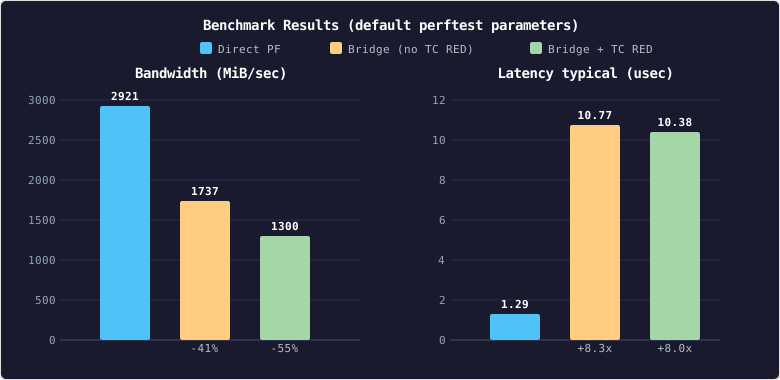
The bridge alone costs ~41% of direct PF bandwidth (see why below). Adding TC RED brings the total loss to ~55%: DCQCN rate reduction is working as intended, throttling the sender in response to CE-marked packets. Latency jumps ~8x from direct to bridged (~1.3 μs → ~10 μs). TC RED adds almost nothing on top (10.77 vs 10.38 μs) because the latency test sends one message at a time and the queue never builds up.
DCQCN Counters
With the bridge in the path and TC RED marking the full DCQCN loop activates. The bandwidth difference between the two bridge configurations (1737 vs 1300 MiB/sec) is entirely due to DCQCN rate reduction. The counters below confirm each role in the loop:
Check the RDMA counters on each VM after a test run
# On vm00 (receiver / NP):
rdma statistic show link mlx5_0/1 | grep -oP '(rp_cnp_handled|np_cnp_sent|np_ecn_marked_roce_packets)\s+\d+'
rp_cnp_handled 0
np_ecn_marked_roce_packets 184
np_cnp_sent 184

# On vm01 (sender / RP):
rdma statistic show link mlx5_0/1 | grep -oP '(rp_cnp_handled|np_cnp_sent|np_ecn_marked_roce_packets)\s+\d+'
rp_cnp_handled 184
np_ecn_marked_roce_packets 0
np_cnp_sent 0
Check the tc counters on the host
tc -s qdisc show dev enp97s0f0np0 | grep -A5 red
qdisc red 800c: root refcnt 505 limit 2000000b min 50000b max 200000b ecn
 Sent 29800422882 bytes 7172249 pkt (dropped 0, overlimits 184 requeues 34)
 backlog 0b 0p requeues 34
  marked 184 early 0 pdrop 0 other 0
The marked count shows 184 packets marked with CE via ECN which matches the NP/RP counters.
Why the Bridge Costs 41% Bandwidth
With direct PF passthrough, RDMA bypasses the host entirely - the NIC reads from one VM’s memory, sends the data over the wire and the other NIC writes it directly into the destination VM’s memory. No host CPU involvement, no kernel processing.
The bridge changes this. Every packet now goes through the host kernel’s networking stack instead of staying in hardware:
- Packet arrives on the wire → NIC notifies the kernel via an interrupt
- Kernel copies the packet into a memory buffer
- Bridge looks up the destination MAC and forwards the packet to the other port
- Kernel hands the packet to the outgoing NIC for transmission
- Packet crosses the second cable to reach the destination VM
We can observe this overhead on the host while running ib_write_bw through the bridge.
CPU usage
The %soft column shows how much CPU time is spent handling network packets in software. During a bridged RDMA test, a few CPUs are heavily loaded while the rest are idle:
# Run on the host during an ib_write_bw test - shows only busy CPUs:
mpstat -P ALL 1 | awk 'NR<=3 || $NF<95'
#  CPU    %usr   %nice    %sys %iowait    %irq   %soft  %steal  %guest  %gnice   %idle
#   30    0.00    0.00    0.00    0.00    1.00   13.00    0.00    0.00    0.00   86.00
#   31    0.00    0.00    0.00    0.00    0.00  100.00    0.00    0.00    0.00    0.00
#   42    1.00    0.00    0.00    0.00    0.00    0.00    0.00   99.00    0.00    0.00
#   62    0.00    0.00    0.00    0.00    0.00    7.00    0.00    0.00    0.00   93.00
CPU 31 spends 100% of its time forwarding packets through the bridge. CPU 42 shows 99% %guest - that’s one of the VMs running the benchmark. All other CPUs sit at 100% idle because bridge forwarding only runs on CPUs that handle the NIC interrupts.
Interrupt and NUMA placement
Which CPUs handle bridge forwarding depends on how the kernel assigns NIC interrupts. We can check where each bridge port’s NIC sits in the system’s NUMA topology:
# Show which CPU and NUMA node handles each bridge port's interrupts
for pci in 41:00.1 61:00.0; do
  dev_numa=$(cat /sys/bus/pci/devices/0000:$pci/numa_node)
  echo "--- $pci (device on NUMA $dev_numa) ---"
  grep "$pci" /proc/interrupts | awk '{gsub(/:/, "", $1); system( \
    "cpu=$(cat /proc/irq/" $1 "/smp_affinity_list);" \
    "cnuma=$(basename $(ls -d /sys/devices/system/cpu/cpu${cpu}/node*) | sed s/node//);" \
    "echo IRQ " $1 " → CPU $cpu NUMA $cnuma")}'
done
# --- 41:00.1 (device on NUMA 2) ---
# IRQ 231 → CPU 63 NUMA 3     ← cross-NUMA!
# IRQ 232 → CPU 1 NUMA 0      ← cross-NUMA!
# ...
# --- 61:00.0 (device on NUMA 3) ---
# IRQ 295 → CPU 62 NUMA 3     ← local
# IRQ 297 → CPU 31 NUMA 3     ← local
# ...
Card B:port0 (61:00.0) is on NUMA node 3 and its interrupts land on NUMA 3 CPUs (30, 31, 62, 63) - local access, optimal. Card A:port1 (41:00.1) is on NUMA node 2 but some of its interrupts land on NUMA 3 CPUs instead, meaning memory access has to cross between CPU dies.
Most cores are reserved for VMs via isolcpus=2-29,34-61 so the kernel can only schedule bridge forwarding work on the few remaining housekeeping CPUs (0, 1, 30, 31, 32, 33, 62, 63).
Interrupt coalescing and latency
The NIC batches multiple incoming packets before raising a single interrupt, trading latency for efficiency:
# Check coalescing settings on a bridge port
ethtool -c enp65s0f1np1 | grep -E "Adaptive|rx-usecs:|rx-frames:"
# Adaptive RX: on  TX: on
# rx-usecs:	32
# rx-frames:	64
The NIC waits up to 32 μs or 64 packets (whichever comes first) before interrupting the CPU. This improves throughput by processing packets in batches but each batch still goes through the full kernel path (interrupt handling, buffer allocation, bridge lookup, TX queuing). Combined with two cable hops instead of one, this explains the latency jump from 1.3 μs (direct hardware) to ~10 μs (bridged).
RX Ring Tuning
The default NIC RX ring size of 1024 entries is a hidden bottleneck. When the kernel’s softirq can’t drain the ring fast enough between poll cycles, the NIC drops incoming packets which is visible in the rx_out_of_buffer counter:
# Check RX ring size
ethtool -g enp65s0f1np1
# RX:  1024 (current) / 8192 (max)

# Monitor drops during ib_write_bw
ethtool -S enp65s0f1np1 | grep rx_out_of_buffer
# rx_out_of_buffer: 1054467    ← packets dropped in 10 seconds!
These drops cause RDMA sequence errors and go-back-N retransmissions, wasting bandwidth.
# On vm00 (receiver):
rdma statistic show link mlx5_0/1 | grep -oP '(packet_seq_err|out_of_sequence)\s+\d+'
out_of_sequence 2164
packet_seq_err 0

# On vm01 (sender):
rdma statistic show link mlx5_0/1 | grep -oP '(packet_seq_err|out_of_sequence)\s+\d+'
out_of_sequence 0
packet_seq_err 2164
Increasing the RX ring to the maximum eliminates the drops and nearly doubles throughput:
ethtool -G enp65s0f1np1 rx 8192
ethtool -G enp97s0f0np0 rx 8192
| RX ring size | Bandwidth (MiB/sec) | rx_out_of_buffer (10s) | RDMA retransmissions |
|---|---|---|---|
| 1024 (default) | 1101 | 1,054,467 | 2,280 |
| 8192 (max) | 1737 | 0 | 0 |
Caveats
Performance - the bridge delivers ~59% of direct PF bandwidth (1737 vs 2921 MiB/sec), dropping to ~45% (1300 MiB/sec) with DCQCN active. Latency rises from ~1.3 μs to ~10 μs.
Marking fidelity - TC RED marks probabilistically based on a software queue depth not based on actual switch buffer pressure. The marking simulates a CP but doesn’t perfectly replicate a hardware switch behavior.
No PFC - Priority Flow Control is another key component of lossless RoCEv2 networks, working alongside DCQCN to prevent packet drops due to buffer overflow. This lab only exercises the ECN/CNP feedback loop. I’ll explore PFC in a follow-up post.
This is experimental - the goal is to demonstrate and exercise the DCQCN mechanism not to build a production congestion control setup.