Enabling GPUDirect RDMA on GeForce GPUs
05 Apr 2026In the previous post I built a software congestion point using a Linux bridge with TC RED to exercise the full DCQCN feedback loop on my point-to-point lab. That experiment successfully triggered ECN marking and CNP generation but ended with a gap: no PFC. Priority Flow Control is the other half of lossless RoCEv2, the L2 backstop mechanism that prevents packet drops when DCQCN can’t reduce rates fast enough. Without PFC the congestion control picture was incomplete.
The problem is that PFC requires actual receiver-side congestion as the NIC internal buffer must fill to the xoff threshold before it sends a PAUSE frame. With CPU-memory RDMA on a 25G link the NIC drains its receive buffer to DRAM at PCIe speed (~7.88 GB/s for Gen3 x8), faster than the 3.1 GB/s wire rate.
As a result I was looking for a way to fill up the NIC buffers and trigger PFC. GPUDirect RDMA seemed like a good candidate as when the NIC DMA target is GPU BAR1 instead of system RAM, the peer-to-peer PCIe path introduces enough latency to exhaust the NIC’s outstanding transaction credits during bidirectional traffic. This would cause DMA writes to stall, creating the backpressure needed to fill the receive buffer. But I soon found out that GPUDirect is not supported on the consumer GeForce cards.
Lucky for me, with the help of Claude Code, I was able to come up with patches to bypass this, since drivers and low level programming are well outside my usual domain. All patches are available in the geforce-gpudirect-rdma repository. Just a quick disclaimer: these patches are strictly for educational and experimental purposes and are absolutely not meant for anything else.
Prerequisites: NVIDIA and OFED Drivers
The lab setup uses CentOS 9 Stream with in-tree kernel drivers for basic RDMA. GPUDirect RDMA requires the NVIDIA GPU driver and MLNX_OFED stack. We build kernel modules from source so we need a fixed kernel version with matching kernel-devel packages. We’ll rebuild the VMs with the Rocky Linux 9.5 cloud image which provides a kernel compatible with the OFED packages:
# On the host — rebuild VMs with Rocky 9.5
curl -L -o /var/lib/libvirt/images/Rocky-9-GenericCloud-Base-9.5.qcow2 \
  https://dl.rockylinux.org/vault/rocky/9.5/images/x86_64/Rocky-9-GenericCloud-Base-9.5-20241118.0.x86_64.qcow2

for vm in vm00 vm01; do
  virsh destroy $vm 2>/dev/null; virsh undefine $vm
  cp /var/lib/libvirt/images/Rocky-9-GenericCloud-Base-9.5.qcow2 \
     /var/lib/libvirt/images/${vm}.qcow2
  qemu-img resize /var/lib/libvirt/images/${vm}.qcow2 100G
  virt-customize -a /var/lib/libvirt/images/${vm}.qcow2 \
    --root-password password:redhat \
    --write /etc/ssh/sshd_config.d/99-root.conf:"PermitRootLogin yes" \
    --run-command 'dnf remove -y cloud-init'
done
Inside the Rocky 9.5 VMs install the drivers. All steps below run on both VMs:
Pin repos and install kernel-devel:
# Pin Rocky repos to 9.5 vault (standard repos serve newer packages)
sed -i 's|^mirrorlist|#mirrorlist|g; s|^#baseurl=http://dl.rockylinux.org/$contentdir|baseurl=https://dl.rockylinux.org/vault/rocky|g; s|\$releasever|9.5|g' \
  /etc/yum.repos.d/rocky*.repo

# Install kernel-devel matching the running kernel
dnf install -y kernel-devel-$(uname -r)

# Blacklist nouveau
echo -e "blacklist nouveau\noptions nouveau modeset=0" > /etc/modprobe.d/blacklist-nouveau.conf
Install NVIDIA user-space driver components - install with rpm --nodeps to bypass unneeded depedenceies. In this case we only need libcuda.so, nvidia-smi and nvidia-modprobe as we’ll build our own kernel modules from source with patches
# Add NVIDIA CUDA repository and enable the 570 module stream
dnf config-manager --add-repo \
  https://developer.download.nvidia.com/compute/cuda/repos/rhel9/x86_64/cuda-rhel9.repo
dnf module enable nvidia-driver:570 -y

# Download the 570.133.20 user-space RPMs
mkdir -p /tmp/nvidia-rpms && cd /tmp/nvidia-rpms
dnf download \
  nvidia-driver-cuda-libs-3:570.133.20-1.el9.x86_64 \
  nvidia-driver-cuda-3:570.133.20-1.el9.x86_64 \
  libnvidia-ml-3:570.133.20-1.el9.x86_64 \
  nvidia-kmod-common-3:570.133.20-1.el9.noarch \
  nvidia-persistenced-3:570.133.20-1.el9.x86_64

# Install with --nodeps to skip the kmod-nvidia dependency
rpm -ivh --nodeps /tmp/nvidia-rpms/*.rpm
Install MLNX_OFED
# Add MLNX_OFED repository
cat > /etc/yum.repos.d/mlnx_ofed.repo << 'EOF'
[mlnx_ofed]
name=MLNX_OFED Repository
baseurl=https://linux.mellanox.com/public/repo/mlnx_ofed/24.10-4.1.4.0/rhel9.5/x86_64/
gpgcheck=0
enabled=1
EOF

# pciutils is needed by rdma-core but not in the mlnx_ofed repo
dnf install -y pciutils lsof libnl3-devel
dnf install -y mlnx-ofed-basic --repo mlnx_ofed
reboot
How GPUDirect RDMA Works
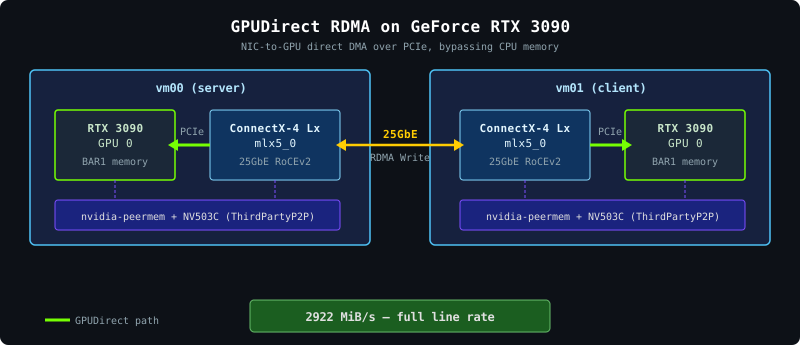
GPUDirect RDMA requires the nvidia-peermem kernel module, which bridges NVIDIA’s GPU memory with the RDMA verbs layer. When ibv_reg_mr is called on a GPU memory address, nvidia-peermem’s callback pins GPU BAR pages via NVIDIA’s P2P API and creates DMA mappings for the NIC.
The Failure
On a system with stock NVIDIA drivers attempting GPUDirect RDMA on GeForce fails immediately:
./ib_write_bw -d mlx5_0 -x 3 --use_cuda=0
# Couldn't allocate MR with error=14
# Failed to create MR
The error=14 (EFAULT) is product segmentation, not a hardware limitation. The error originates from the kernel’s pin_user_pages failing on GPU MMIO addresses. What happens internally: nvidia-peermem’s nv_mem_acquire calls nvidia_p2p_get_pages, which fails with -EINVAL because no ThirdPartyP2P (NV503C) object exists for this process. nv_mem_acquire then returns 0 (“not my memory”) so OFED falls through to pin_user_pages which can’t pin GPU BAR pages and returns EFAULT. On data center GPUs the CUDA runtime creates the NV503C object automatically and nvidia_p2p_get_pages succeeds. On GeForce, it simply never does.
Enabling GPUDirect RDMA on GeForce
Getting GPUDirect RDMA on GeForce requires solving two problems: enabling BAR1 P2P in the kernel driver and creating the missing ThirdPartyP2P objects.
Step 1: Patch the kernel driver for BAR1 P2P
tinygrad’s fork of open-gpu-kernel-modules patches the kernel RM to enable BAR1-based P2P on GeForce GPUs. Their patches redirect function table entries and force the P2P type to BAR1. I ported these patches to the 570.133.20 open modules:
# Clone NVIDIA open modules matching our driver version
git clone --depth 1 -b 570.133.20 \
  https://github.com/NVIDIA/open-gpu-kernel-modules.git /tmp/ogkm
cd /tmp/ogkm

# Apply patches (see Steps 1-2 below for what they do)
git apply /root/geforce-gpudirect-rdma/01-open-gpu-kernel-modules-bar1-p2p.patch
git apply /root/geforce-gpudirect-rdma/02-nvidia-peermem-persistent-p2p.patch

# Build all patched modules together
make modules -j$(nproc)

# Install patched open modules
mkdir -p /lib/modules/$(uname -r)/extra
cp kernel-open/nvidia.ko kernel-open/nvidia-modeset.ko \
   kernel-open/nvidia-uvm.ko kernel-open/nvidia-peermem.ko \
   /lib/modules/$(uname -r)/extra/
depmod -a

# Enable open modules on GeForce
cat > /etc/modprobe.d/nvidia-open.conf << 'EOF'
options nvidia NVreg_OpenRmEnableUnsupportedGpus=1
EOF

# Reload — each module must be a separate modprobe call
rmmod nvidia_peermem nvidia_uvm nvidia_modeset nvidia
modprobe nvidia
modprobe nvidia_uvm
modprobe nvidia_peermem
NVreg_OpenRmEnableUnsupportedGpus=1 is required because the open kernel modules don’t officially support GeForce GPUs.
After loading the patched modules GPU-to-GPU P2P should work. But GPUDirect RDMA would still fail as the CUDA user-space driver still doesn’t create ThirdPartyP2P objects.
Step 2: Patch nvidia-peermem for persistent P2P
The second patch (already applied and built above) switches nvidia-peermem from the legacy nvidia_p2p_get_pages API to nvidia_p2p_get_pages_persistent. The persistent API looks up ThirdPartyP2P objects by process ID instead of requiring a pre-existing token which is essential for user-space-created NV503C objects.
Step 3: Create ThirdPartyP2P from user space
The key insight is that we can create the missing NV503C object ourselves via RM ioctls on /dev/nvidiactl. The approach hooks ioctl() to capture the internal handles that CUDA creates during initialization, then uses them to create the ThirdPartyP2P object and register the GPU memory allocation with it.
With all three pieces in place ibv_reg_mr on GPU memory succeeds and the NIC can read from and write to the GPU directly over PCIe.
End-to-End Testing
With all three patches in place let’s verify that all components are loaded correctly inside both VMs:
# Patched NVIDIA modules loaded with peermem bridging to ib_uverbs
lsmod | grep -E "nvidia|ib_uverbs"
# nvidia_uvm           4001792  0
# nvidia_peermem         20480  0
# nvidia              11669504  2 nvidia_uvm,nvidia_peermem
# ib_uverbs             225280  3 nvidia_peermem,rdma_ucm,mlx5_ib

# Peer memory client registered with OFED
cat /sys/kernel/mm/memory_peers/nv_mem/version
# 570.133.20

# GPU detected with correct driver version
nvidia-smi --query-gpu=name,driver_version,pci.bus_id --format=csv,noheader
# NVIDIA GeForce RTX 3090, 570.133.20, 00000000:05:00.0

# Patched module loaded from /extra/ (not a kmod RPM)
modinfo nvidia | grep -E "filename|version:"
# filename:       /lib/modules/5.14.0-503.14.1.el9_5.x86_64/extra/nvidia.ko
# version:        570.133.20

# RDMA device active
ibv_devinfo mlx5_0 | grep -E "state|active_mtu"
#			state:			PORT_ACTIVE (4)
#			active_mtu:		4096 (5)
Build patched perftest
The third patch modifies perftest’s cuda_memory.c to embed the ioctl hook, VMM API allocation and NV503C creation from Step 3 directly into perftest, implementing the full GPUDirect RDMA setup without any external tools.
Build it on both VMs:
# Install CUDA toolkit (repo was added during driver setup)
dnf install -y cuda-nvcc-12-8 cuda-cudart-devel-12-8 \
  pciutils-devel git automake autoconf libtool gcc gcc-c++

git clone https://github.com/linux-rdma/perftest.git /tmp/perftest-gd
cd /tmp/perftest-gd
git apply /root/geforce-gpudirect-rdma/03-perftest-gpudirect-geforce.patch
./autogen.sh
CUDA_H_PATH=/usr/local/cuda-12.8/include/cuda.h ./configure
make -j$(nproc)
Run the test
GPUDIRECT_GPU selects the CUDA device index (0 in our single-GPU VMs), --use_cuda=0 tells perftest to allocate RDMA buffers in GPU memory:
# Server (on vm00):
GPUDIRECT_GPU=0 ./ib_write_bw -d mlx5_0 -x 3 --use_cuda=0

# Client (on vm01):
GPUDIRECT_GPU=0 ./ib_write_bw -d mlx5_0 -x 3 --use_cuda=0 10.0.0.1
The [gpudirect] log lines confirm the ioctl hook captured CUDA’s RM handles, created the NV503C object, and registered GPU memory for RDMA:
[gpudirect] GPUDirect RDMA support loaded (GPU 0)              ← constructor ran
[gpudirect] GPU 0 ready: client=0xc1d00003 subdev=0x5c000003 va=0x5c000007  ← handles captured
[gpudirect] Enabled: ptr=0x7fee26200000 sz=2097152 P2P=0xdead0001  ← NV503C created + vidmem registered
#  #bytes     #iterations    BW peak[MiB/sec]    BW average[MiB/sec]   MsgRate[Mpps]
#  65536      5000             2920.66            2920.60               0.046730
Benchmark Results
Full bandwidth sweep across all message sizes using the patched perftest:
# GPUDIRECT_GPU=0 ./ib_write_bw -d mlx5_0 -x 3 --use_cuda=0 -a 10.0.0.1
#  #bytes     #iterations    BW peak[MiB/sec]    BW average[MiB/sec]   MsgRate[Mpps]
#  2          5000             6.38               6.29                  3.296764
#  64         5000             202.77             174.24                2.854742
#  512        5000             1608.81            1564.80               3.204718
#  1024       5000             2705.13            2687.07               2.751557
#  4096       5000             2908.56            2907.58               0.744341
#  65536      5000             2920.87            2920.80               0.046733
#  1048576    5000             2921.73            2921.73               0.002922
Peak bandwidth hits ~2922 MiB/s (~24.5 Gbps), saturating the 25GbE link and matching CPU-memory RDMA results from the lab setup.
Compare GPUDirect RDMA vs CPU-memory RDMA on the same link:
| Message Size | CPU Memory | GPU Memory | Ratio |
|---|---|---|---|
| 1 KB | 2722 MiB/s | 2687 MiB/s | 98.7% |
| 64 KB | 2709 MiB/s | 2921 MiB/s | 107.8% |
| 1 MB | 2740 MiB/s | 2922 MiB/s | 106.6% |
Verifying the Data Path
How do we know data is actually moving directly between the NICs and GPUs and not going through CPU memory? nvidia-smi dmon -s t shows real-time PCIe traffic per GPU. Run it during a sustained GPUDirect transfer:
# Start a sustained transfer (-D 30 for 30 seconds):
# vm00 (server): GPUDIRECT_GPU=0 ./ib_write_bw -d mlx5_0 -x 3 --use_cuda=0 -D 30
# vm01 (client): GPUDIRECT_GPU=0 ./ib_write_bw -d mlx5_0 -x 3 --use_cuda=0 -D 30 10.0.0.1

# While running, on vm00 (receiver):
nvidia-smi dmon -s t -d 1 -c 3
# gpu  rxpci  txpci
# Idx   MB/s   MB/s
#   0   3225      0
#   0   3224      0
#   0   3225      0

# On vm01 (sender):
nvidia-smi dmon -s t -d 1 -c 3
# gpu  rxpci  txpci
# Idx   MB/s   MB/s
#   0    759   3606
#   0    759   3605
#   0    759   3606
The receiver GPU shows ~3.2 GB/s PCIe RX while the sender GPU shows ~3.6 GB/s PCIe TX as the NICs are writing/reading RDMA data directly to/from GPU BAR1 memory.
What’s Next
In the next post I’ll use this newly enabled GPUDirect traffic to generate PFC pause frames which is something I couldn’t quite pull off with standard CPU-memory RDMA. This will finally complete the lossless RoCEv2 picture started in my software congestion control software congestion point experiment.